
This is an old revision of the document!
Table of Contents
Grid view - Reset and Save
Save
Introduction:In the program a user is able to save grid settings. It can be done in any global form in the program: Brokerage Dispatch, Brokerage Invoicing, Truck Dispatch, Truck Invoicing.
Action: Go to Brokerage Dispatch or Brokerage Invoicing or Truck Dispatch or Truck Invoicing → System → Settings → Brokerage\Truck Preferences → Save Grid Settings → Close → Close the tab → Open the tab again
How should the process look like:
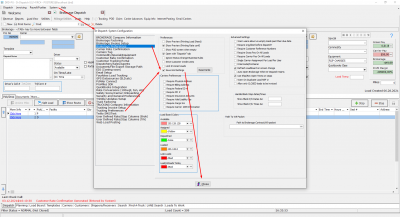
Expected Result:
Saved Grid should be exactly in the same position as was left by the user before closing the tab.
Reset
Introduction:In the program a user is able to reset grid settings. It can be done in any global form in the program: Brokerage Dispatch, Brokerage Invoicing, Truck Dispatch, Truck Invoicing.
Action: Go to Brokerage Dispatch or Brokerage Invoicing or Truck Dispatch or Truck Invoicing → System → Settings → Brokerage\Truck Preferences → Reset Grid → Close → Close the tab → Open the tab again


