
Table of Contents
Grid view - Reset and Save
Save
Introduction:In the program a user is able to save grid settings. It can be done in any global form in the program: Brokerage Dispatch, Brokerage Invoicing, Truck Dispatch, Truck Invoicing.
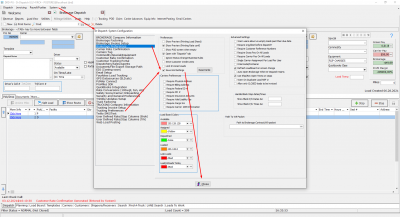
Action: Go to Brokerage Dispatch or Brokerage Invoicing or Truck Dispatch or Truck Invoicing → System → Settings → Brokerage\Truck Preferences → Save Grid Settings → Close → Close the tab → Open the tab again
How should the process look like:
Expected Result:
Saved Grid should be exactly in the same position as was left by the user before closing the tab.
Reset
Introduction:In the program a user is able to reset grid settings. It can be done in any global form in the program: Brokerage Dispatch, Brokerage Invoicing, Truck Dispatch, Truck Invoicing.
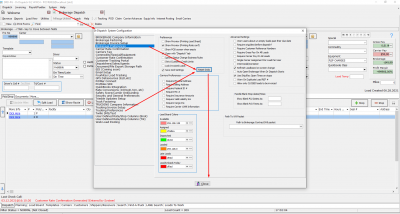
Action: Go to Brokerage Dispatch or Brokerage Invoicing or Truck Dispatch or Truck Invoicing → System → Settings → Brokerage\Truck Preferences → Reset Grids → Yes → Yes → Close
How should the process look like:
Expected Result:
The grid should be reset to default at the point in time when the user clicks on the Reset Grids button. And if the user closes the tab and then is coming back, the grid still should have a default preview.


