
tc-3
Table of Contents
Print report by User in the Revenue window
Introduction: In the program, you can generate and print a report in the context of users.
BRK section:
Data preparation:
- Log in to the program as one of the users.
Action: Go to “Brokerage dispatch” → “Revenue” → “Users” Select a user from the dropdown list. Click menu “Report” → “User totals” → “Simple”
Expected Result:
The following report will appear on the screen:
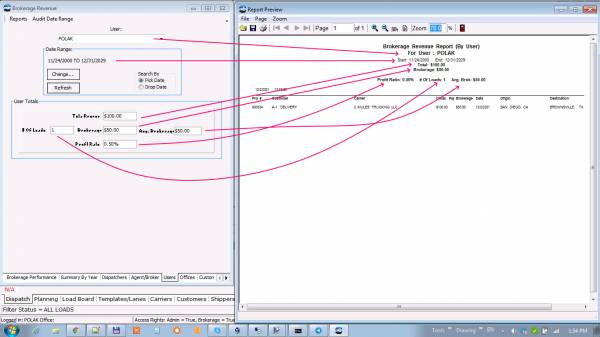 The selected user will be listed in the “For User” field. The header of the report will fully correspond to the figures in the Revenue window (Period, Totals, etc.)
The list of documents will consist only of those that were created by the selected user, including the document that you created at the stage of data preparation.
The selected user will be listed in the “For User” field. The header of the report will fully correspond to the figures in the Revenue window (Period, Totals, etc.)
The list of documents will consist only of those that were created by the selected user, including the document that you created at the stage of data preparation.
TRK section:
TODO
tc-3.txt · Last modified: 2026/01/31 01:36 by 45.148.10.95
Except where otherwise noted, content on this wiki is licensed under the following license: CC Attribution-Share Alike 4.0 International


