
Operations with grids: Check all, Uncheck all, Invert, Check selected, Uncheck selected.
Introduction:
Some grids that have checkboxes for selection allow you to do complex operations.
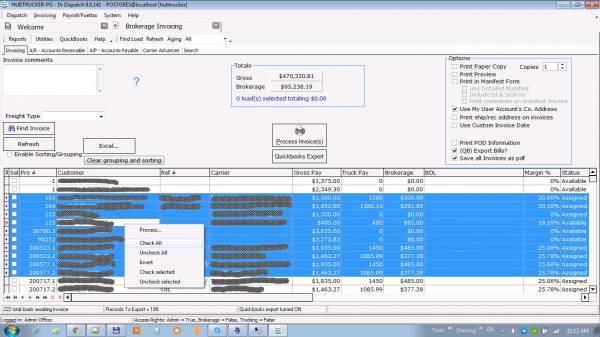 Check all:
Right-click in the grid area and select the “Check All” menu item
Expected Result:
All rows will have checkmarks in the “Selected” column
Check all:
Right-click in the grid area and select the “Check All” menu item
Expected Result:
All rows will have checkmarks in the “Selected” column
Uncheck all: Right-click in the grid area and select the “Uncheck All” menu item Expected Result: No row will be checked in the “Selected” column
Invert: Right-click in the grid area and select the “Invert” menu item Expected Result: Those lines that had marks will be unchecked, and those that have been marked will no longer have a mark in the “Selected” column
Check selected: Right-click in the grid area and select the “Check selected” menu item Expected Result: Those lines, which were selected, will have marks in the “Selected” column. No other line will change its state.
Uncheck selected: Right-click in the grid area and select the “Uncheck selected” menu item Expected Result: Those lines that have been selected will not have a mark in the “Selected” column. No other line will change its state.


