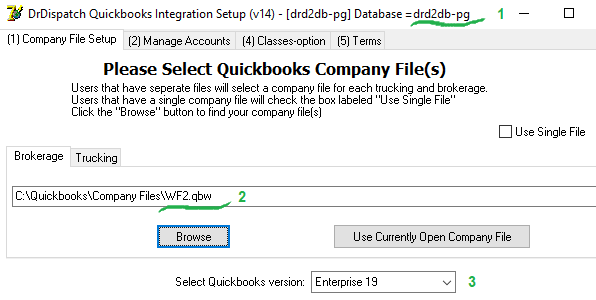
Checking the connection of the Quickbooks Setup Project to different db
Accessing our various databases on a multi-database system is possible with the -a flag, which we can use for desktop shortcuts. (just like DrDisp.exe)
Initial conditions For the test, you need to have access to at least 2 different databases. To do this, the file “…\AppData\Roaming\DrDispatch\ConnectionDefs.ini” should describe connections to these databases.
The first database from the file will be the main database and can be accessed without any keys.
To access other databases, you need to use the -a switch and the database name after the switch in the command line for starting the program.
Action: Create 2 shortcuts referring to drdqbsetup.exe
In one of them, in the target line, add the -a key and the name of the second database
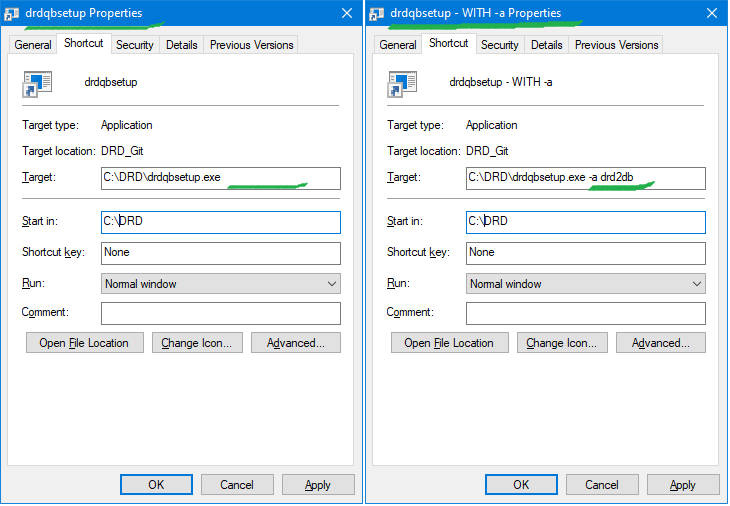 (for example, drd2bd)
Action: Run a shortcut without a key
Expectation:
- Make sure default db is selected
- Select company quickbook file
- Select a quickbook version for this file
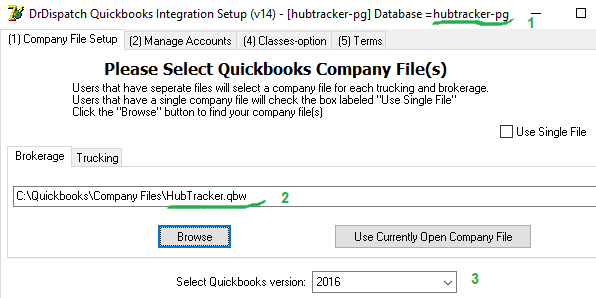
Action: Run a shortcut with the -a switch
Expectation:
- Make sure the database after the key is selected
- Select company quickbook file
- Select a quickbook version for this file