
tc-15
This is an old revision of the document!
Create Truck Load
Action:
Option 1: Click Truck Dispatch in the Trucking section of the Welcome page 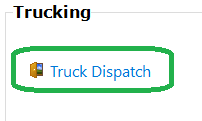
Option 2: Menu Dispatch → Trucking 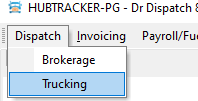
Expected: The Truck Dispatch tab opens with a Dispatch sub-tab and last saved load.
Action: To create a new load press then “New” button.
Expected: In the Pro No field the new calculated value will be substituted. The minimum possible set of 2 stops will be created in the grid
Action: After that, you need to fill in the fields Driver 1, Customer, Gross pay (similar to “gross pay” from Brokerage loads), Driver pay .
In the grid of stops you need to fill in Facility, City, Date
tc-15.1748079655.txt.gz · Last modified: 2025/05/24 12:40 by 20.171.207.138
Except where otherwise noted, content on this wiki is licensed under the following license: CC Attribution-Share Alike 4.0 International


