Table of Contents
ProMiles SDK testing
Presetting
Action: Prepare new load
Checking if ProMiles SDK is enabled
Action Open the “Brokerage Dispatch” form, look at the “Update miles” button and the “Mileage Utilities” menu.
Excpectation They must be inactive.
Action Remember their real state
Action: Open “System → Settings” menu
Expection: Form “Dr.Dispatch System Configuration” will open
Action: Select “ProMiles SDK” from the left column and look at the checkbox “Use ProMiles Prime”.
Check: If the checkbox is not checked, the “Update miles” button and the “Mileage Utilities” menu should be inactive.
If everything is correct - check the box, and proceed to the next step
Checking work with correct settings
Action: Enter the correct key in the “ProMiles Prime API key” field and close window
Action: Reopen broker window Be sure to close and open
Checking work with incorrect settings
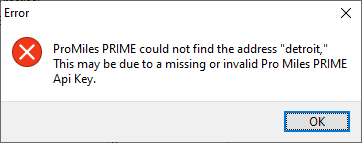
Action: Do not fill in the “ProMiles Prime API key” field (or fill it with a random set of characters) and close window
Action: Reopen broker window Be sure to close and open
Action: Press “Update Miles”
Excpectation:
Excpectation: Show error message