
Table of Contents
Testing the Revenue Report
Preparing for testing
Before testing, you need to create several different loads in one period (for example, a week). They should have different amounts and different customers and careers, but not all unique, several different loads should have the same customers (to test the process of grouping and summing by groups)
Testing
Open Revenue form

Date range selection
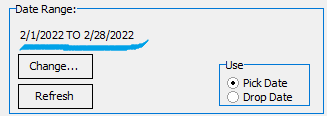 Action: If the date range for selecting data from the report does not match the required one, then click the “change” button
Excpection: The “Data Range” tab is activated
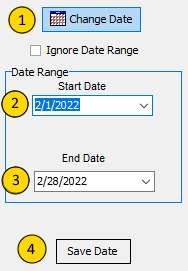
(1). Action: press “Change date”
Excpection: Fields for entering dates should be activated (2) (3)
Action: Enter the start (2) and end (3) dates for data sampling for the report
(4). Action: Press “Save Date”
Excpection: Fields (2) (3) should be deactivated
Open Revenue Report
Action: Click Menu “Report → Revenue Report → Detail”
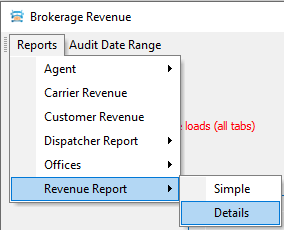 Expection: “Output option” window will appear.
Action: Select “Printer” or Preview“ Report Destination and click “Ok”
Reconciliation of appearance and double-checking of amounts


