
tc-19
Table of Contents
When creating a document, by default the seller is entered through the client, and then you can change the seller directly when the loading.
Remark: In order to simplify testing, we can create 2 documents with the same seller. This will allow you not to repeat the action to create / verify payroll twice.
Creating Loads
Action: Create “Brk Load”. Remember seller.
Action: Create “Trk Load”
Action: Change the seller to the same as in the document “Brk Load”
Expectation:
2 documents with the same seller must be created and filled.
Create Payroll
Action: Press button “Saleman Payroll” from Welcome page or
Action: select menu item “Payroll/Fueltax - Saleman Payroll”
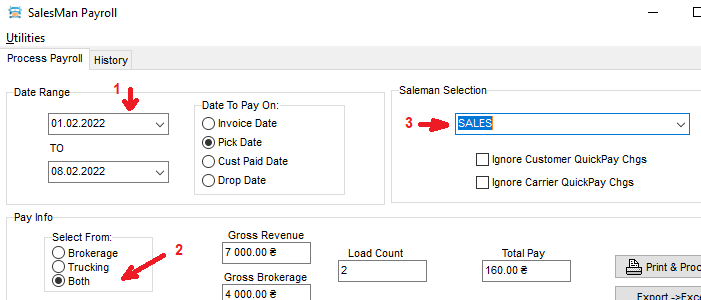 Action:
- Select date range
- Select the type of processed loads
- Select seller
- Wait for the grid to be filled with the data of his loads
Expectation:
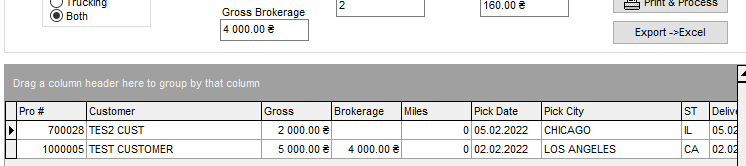
2 rows should appear in the grid corresponding to the previously created documents
Action: Close a window
Salesman lock/unlock check
Action: Return to “BRK Load”
Expectation: 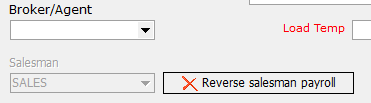
The field "Saleman", make sure that it is inactive and there is a button next "Reverse salesman payroll"
Action: Change seller
Action: Return to “TRK Load”
Expectation: 
The field "Saleman", make sure that it is inactive and there is a button next "Reverse salesman payroll"
Action: Change seller
Additional verification of payroll ownership
Go to “Sales Payroll”
- Action: Check payroll on the observations of the salesperson.
- Expectation: no more amounts are expected
- Action: Salary check on a new seller,
- Expectation: for sure that the lines appeared
tc-19.txt · Last modified: 2025/12/13 10:16 by 216.73.216.58
Except where otherwise noted, content on this wiki is licensed under the following license: CC Attribution-Share Alike 4.0 International


