
tc-24
This is an old revision of the document!
Table of Contents
Customer Rate Calculating
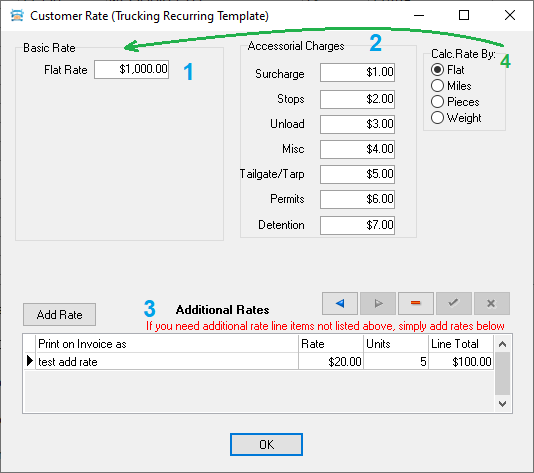 The amount consists of 3 main parts
- Basic Rate (1)
- Accessorial Charges (2)
- Additional Rates (3)
Moreover, the Basic Rate can be calculated in several different ways, depending on the “Calc.Rate By” switch (4).
That is,
- “Basic Rate”
- + Sum of all fields “Accessorial Charges”
- + Sum of all fields “Line Total” from the Grid “Additional Rates”
- = “Gross Pay”
The calculated amount is not immediately visible, it can only be seen in the Gross pay field after saving the window. Fill in all fields with different values. This will allow you to see in one save whether all the amounts are used and if some are not, then determine exactly which one.
Flat
Action: if the fields are filled in as in the first figure and save (click OK and confirm saving)
Expectation: “Gross Pay” = 1128
Miles
Pieces
Weight
tc-24.1748079718.txt.gz · Last modified: 2025/05/24 12:41 by 20.171.207.138
Except where otherwise noted, content on this wiki is licensed under the following license: CC Attribution-Share Alike 4.0 International


